Learn how overly aggressive Snowflake auto-suspend settings can create resume/suspend thrashing, increase minimum billing overhead, and hurt workload performance.
Introduction
Auto-suspend is one of the most important Snowflake cost controls.
When a virtual warehouse is no longer processing queries, auto-suspend can pause it after a defined period of inactivity. This prevents warehouses from sitting idle and consuming credits when no useful work is happening.
But there is a common mistake: setting auto-suspend too low everywhere. At first, that sounds like a good idea. If idle time wastes credits, then shorter auto-suspend should save more money, right? Not always.
For some workloads, an overly aggressive auto-suspend setting causes the warehouse to stop and restart repeatedly between small query gaps. This is called resume/suspend thrashing.
Instead of saving money, thrashing can create unnecessary restart overhead, slower user experience, cache loss, and confusing cost patterns.
The better rule is simple:
Auto-suspend should be low enough to prevent idle waste, but long enough to avoid constant restart cycles.
What is resume/suspend thrashing in Snowflake?
Resume/suspend thrashing happens when a warehouse repeatedly suspends and resumes in a short period of time.
For example, imagine a BI warehouse that receives one query every two minutes. If auto-suspend is set to 60 seconds, the warehouse may suspend after each query and then resume again for the next one.
The pattern looks like this:
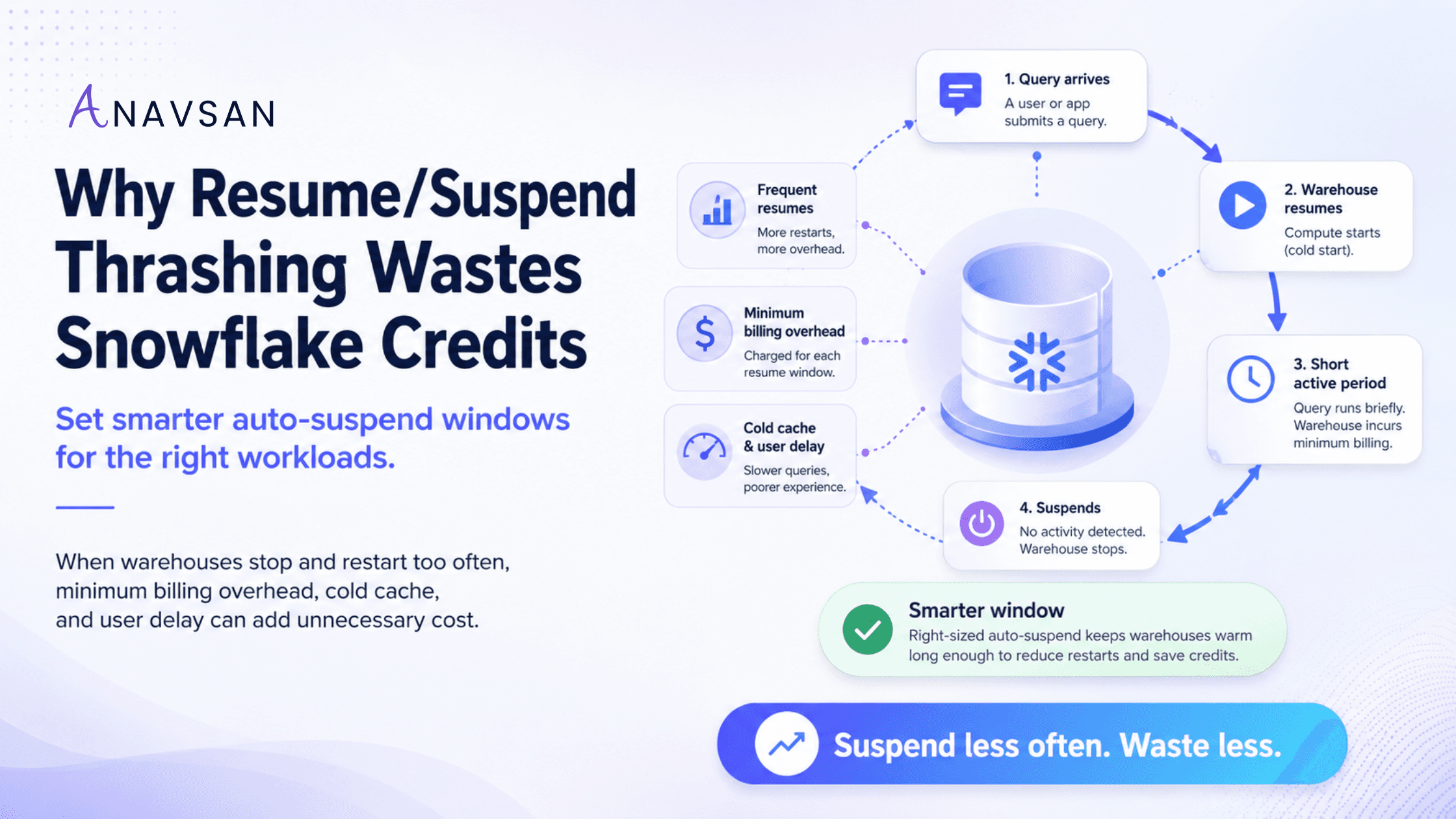
Query runs → warehouse becomes inactive → auto-suspend triggers → next query arrives → warehouse resumes → query runs → warehouse suspends again.
If this cycle happens occasionally, it may not be a major issue. But when it happens repeatedly across many queries, dashboards, users, or scheduled jobs, it becomes a cost governance problem.
Resume/suspend thrashing is especially common in:
- BI dashboards with intermittent refreshes
- Analyst warehouses used in short bursts
- Development warehouses with frequent small queries
- Partner tool workloads that poll or sync periodically
- Snowsight or notebook usage with small gaps between interactions
- Scheduled jobs that run in loosely spaced steps
Why resume/suspend thrashing can waste credits
Snowflake uses per-second billing for warehouses, but provisioning compute has a minimum billing period. This means that each time a warehouse resumes, there can be a minimum charge window.
If a warehouse resumes, runs briefly, suspends, and then resumes again soon after, the team may pay multiple minimum billing windows for fragmented usage.
The cost pattern looks like this:
Short query gap → warehouse suspends → next query resumes warehouse → minimum billing window repeats → credit waste increases.
This does not mean auto-suspend is bad. Auto-suspend is essential. The problem is using a suspend window that does not match the workload.
A warehouse that receives queries every few minutes may be cheaper and smoother with a slightly longer suspend window than with a very aggressive one.
The hidden performance cost: cold cache
Resume/suspend thrashing can also affect performance.
When a warehouse is running, it can maintain a local cache of data accessed by recent queries. This cache can help repeated or related queries run faster. When the warehouse suspends, that cache can be dropped.
After resume, the first few queries may run slower because the warehouse needs to rebuild useful cache state.
For workloads where users run related queries in sequence, this matters. An analyst may run a query, inspect the result, adjust a filter, and run again. A BI dashboard may refresh several tiles in short intervals. A notebook may execute multiple cells with pauses between them.
If the warehouse suspends between these natural steps, users may experience slower query performance and teams may see more repeated scanning.
This is why the cheapest-looking auto-suspend value may not be the most cost-effective value.
Auto-suspend is a workload decision, not a universal default
Many Snowflake teams apply one auto-suspend value across all warehouses. This is easy to manage, but it ignores workload behavior.
Different workloads need different suspend windows.
ETL and dbt workloads
Batch workloads often run in clear execution windows. A job starts, runs transformations, and finishes. If the warehouse will not be used again soon, a short auto-suspend value can work well.
But if the pipeline has steps separated by short gaps, a very low setting can cause repeated resume cycles between tasks.
BI dashboard workloads
BI warehouses often receive intermittent bursts throughout the day. A dashboard may load, then another user may refresh it a few minutes later. If the suspend window is too short, the warehouse may constantly stop and restart during business hours.
For BI, the right setting should consider dashboard refresh frequency, user concurrency, and acceptable latency.
Ad-hoc analyst workloads
Analysts do not usually run queries continuously. They think, edit, rerun, compare, and iterate. If auto-suspend is too aggressive, the warehouse may suspend between normal analysis steps.
A moderate suspend window can reduce idle waste without disrupting analysis.
Development and testing workloads
Development warehouses are often good candidates for aggressive auto-suspend because they are used irregularly and are easy to forget. But even here, teams should watch for excessive resume cycles during active development sessions.
Application workloads
Application-driven queries may require predictable latency. If the application sends queries every few minutes, suspending after every request may not be ideal. The right setting depends on usage patterns and latency expectations.
How to detect resume/suspend thrashing
Resume/suspend thrashing is not always obvious from total warehouse credits. Teams need to look at warehouse activity patterns.
Useful signals include:
- High number of warehouse resumes in a short period
- Frequent suspend/resume events during business hours
- Short warehouse runtimes after each resume
- Queries arriving shortly after suspension
- User complaints about first-query latency
- BI dashboards loading slowly after idle gaps
- Credit usage spread across many small active windows
- Warehouses with low query volume but frequent resumes
- Auto-suspend values lower than typical query arrival gaps
The key question is:
Is the warehouse suspending during real idle time, or between queries that are part of the same workload pattern? If it is suspending between related queries, the setting may be too aggressive.
How to set smarter auto-suspend windows
1. Review query arrival gaps
Before changing auto-suspend values, study how queries arrive.
If a warehouse often has 2 to 3 minute gaps between queries, setting auto-suspend to 60 seconds may create unnecessary restart cycles. If the warehouse has 30-minute gaps, a short setting may be appropriate.
The suspend window should be based on real workload behavior, not guesswork.
2. Segment warehouses by workload type
Do not use the same setting for every warehouse. A development warehouse, BI warehouse, batch transformation warehouse, and application warehouse may all need different policies. Segmenting by workload type makes governance more practical.
3. Avoid “lowest possible” thinking
The goal is not to set auto-suspend to the lowest possible number. The goal is to minimize total cost while maintaining acceptable performance.
For some warehouses, 60 seconds may be right. For others, 5 minutes may be better. For some steady workloads, a longer window may make sense during business hours.
4. Balance idle savings and resume overhead
A good setting reduces idle time without causing constant resume cycles.
Ask:
- How often does the warehouse resume?
- How long does it stay active after each resume?
- Are queries arriving soon after suspension?
- Are users waiting on resume latency?
- Did lowering auto-suspend actually reduce credits?
If lowering the setting increases resume frequency without reducing total credits meaningfully, it may not be the right setting.
5. Consider business hours and off-hours differently
Some workloads have strong business-hour patterns. A BI warehouse may receive queries every few minutes during the workday and then sit idle overnight.
In that case, teams may use one strategy during business hours and rely on aggressive suspension during off-hours. The important point is to govern by usage pattern, not static assumptions.
6. Watch cache-sensitive workloads
If a workload benefits from warehouse cache, suspending too often may hurt performance. This does not mean the warehouse should run forever. It means the auto-suspend window should consider whether related queries are likely to arrive soon.
Cache-sensitive workloads often include dashboards, repeated analytical queries, and exploratory sessions.
7. Measure before and after
Changing auto-suspend settings should be treated like an optimization experiment.
Measure:
- Credit consumption
- Idle runtime
- Resume count
- Average query latency
- First-query performance after resume
- User complaints
- Dashboard load time
- Warehouse active windows
The best setting is the one that improves cost without creating avoidable performance problems.
Why this is a governance issue
Resume/suspend thrashing is not only a technical tuning issue. It is a governance issue because it requires ownership, monitoring, and workload context.
A central FinOps team may see many resumes, but they may not know whether those resumes are caused by dashboards, analysts, dbt jobs, notebooks, or partner tools.
A data engineering team may know the workload pattern, but they may not see the credit impact. A BI team may see slow dashboard loads, but not know auto-suspend is part of the reason.
Good governance connects these signals:
- Warehouse setting
- Workload type
- Query arrival pattern
- Resume frequency
- Cost impact
- Performance impact
- Ownership
Without that context, teams may either leave warehouses running too long or suspend them too aggressively. Both can waste money.
Practical checklist for data teams
Use this checklist when reviewing auto-suspend thrashing:
- How often does this warehouse resume per day?
- How long does it run after each resume?
- Are queries arriving shortly after suspension?
- Is auto-suspend lower than the typical query gap?
- Is the workload BI, ETL, ad-hoc, application, or development?
- Are users experiencing first-query delays?
- Is warehouse cache important for this workload?
- Did a lower auto-suspend setting actually reduce credits?
- Is the warehouse active overnight or during weekends?
- Who owns the warehouse and its cost policy?
- Should the suspend window vary by workload or time of day?
- Did the final setting reduce both idle waste and resume churn?
This checklist helps teams avoid treating auto-suspend as a checkbox and start treating it as a workload policy.
Conclusion
Auto-suspend is essential for Snowflake cost control, but it is not a one-size-fits-all setting.
If the suspend window is too long, warehouses sit idle and waste credits. If the suspend window is too short, warehouses may repeatedly stop and restart between natural query gaps. That creates resume/suspend thrashing.
The right answer is workload-aware governance.
Study query arrival patterns. Segment warehouses by workload type. Avoid blindly setting every warehouse to the lowest value. Balance idle savings with resume overhead, cache behavior, and user experience.
The best Snowflake teams do not simply ask:
“How low can we set auto-suspend?”
They ask:
“What suspend window matches this workload’s real behavior?” That shift turns auto-suspend from a basic cost setting into a practical governance lever.
Start this week by reviewing warehouses with frequent resume events and short active windows. Look for cases where queries arrive shortly after suspension.
Anavsan helps Snowflake teams move from warehouse-level cost visibility to workload accountability by detecting idle runtime, resume/suspend patterns, ownership gaps, and optimization impact across Snowflake workloads. Signup here.
See how Anavsan governs your Snowflake costs
APEX detects cost anomalies, assigns them to the owning engineer, and documents savings with proof — automatically.