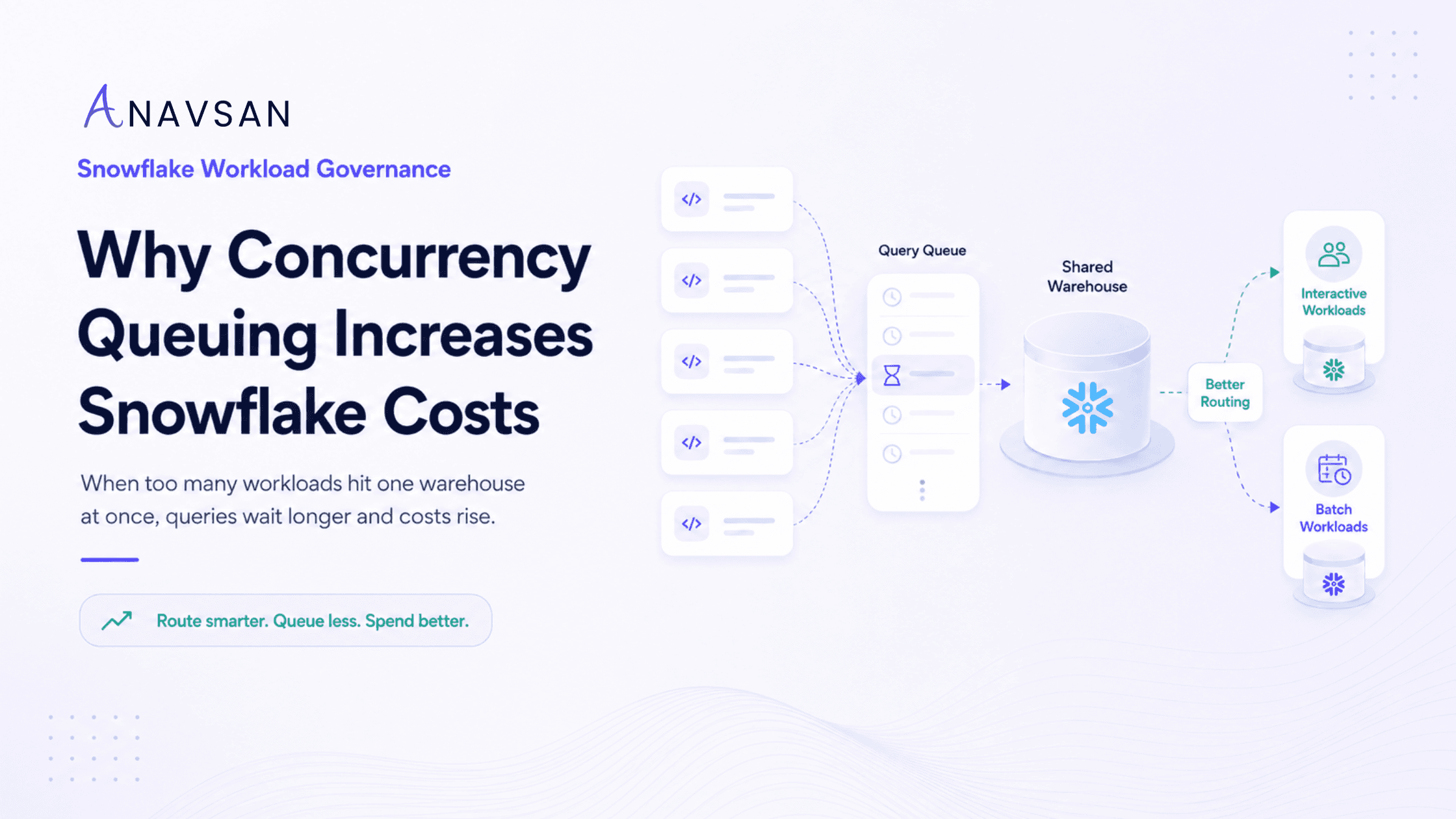
Learn how Snowflake concurrency queuing affects warehouse runtime, query performance, and credit consumption, and how better workload routing can reduce avoidable cost.
Introduction
Snowflake teams often focus on the queries that are actively running. They look for long execution time, high bytes scanned, query spillage, or full table scans.
But there is another cost signal that is easy to overlook:
queries waiting in queue.
Concurrency queuing happens when more queries are submitted to a Snowflake warehouse than it can execute efficiently at the same time. Some queries run immediately. Others wait.
At first, this looks like a user-experience problem. Dashboards load slowly. Analysts wait for results. Pipelines take longer to finish. But queuing can also become a Snowflake cost governance problem.
Why?
Because queued workloads can keep warehouses active longer, create pressure to increase warehouse size, trigger multi-cluster scale-out, and hide inefficient workload routing.
In simple terms:
Too many queries on the same warehouse → queuing → longer workload windows → more active warehouse time → higher Snowflake credits.
What is concurrency queuing in Snowflake?
Concurrency queuing happens when a warehouse receives more work than it can process at once.
Snowflake warehouses can run multiple queries concurrently, but capacity is not unlimited. When many queries arrive at the same time, Snowflake may queue some of them until resources are available.
This can happen during:
- BI dashboard refresh windows
- Morning login spikes
- Hourly reporting schedules
- dbt or ELT job runs
- Ad-hoc analyst activity
- Data science workloads
- Partner tool activity
- Application-driven analytics
Queuing does not always mean something is broken. A small amount of queuing may be normal during busy periods. The issue appears when queuing becomes frequent, predictable, or tied to specific workloads that should be routed differently.
Why concurrency queuing increases Snowflake costs
Concurrency queuing affects cost indirectly. A queued query is not necessarily burning compute while it waits, but queuing changes how long warehouses stay active and how teams respond to performance pressure.
The cost pattern usually looks like this:
Concurrency spike → queued queries → longer workload completion window → warehouse stays active longer → more credits consumed. There are a few ways this happens.
1. Queues extend warehouse runtime
If many queries arrive at once, the warehouse may need more time to finish the entire workload batch. Even if individual queries are not expensive, the total workload window becomes longer.
A warehouse that could have completed work in 10 minutes may stay active for 30 minutes because queries are waiting and executing in waves.
That extended active time can increase credit consumption.
2. Teams over-size warehouses to reduce wait time
When users complain about slow dashboards or delayed reports, the first reaction is often to increase warehouse size.
A larger warehouse can improve performance for some workloads, but it also increases the credit rate. If the real problem is poor workload routing or refresh scheduling, resizing may simply make an inefficient pattern more expensive.
3. Multi-cluster can absorb concurrency at a cost
Multi-cluster warehouses can help handle concurrency by adding clusters when demand rises. This can reduce queuing and improve user experience.
But additional clusters consume additional credits while active.
Multi-cluster is useful when concurrency is legitimate and business-critical. It is not a substitute for fixing avoidable query bursts, overly frequent dashboard refreshes, or mixed workload contention.
4. Important workloads get blocked by noisy workloads
A warehouse may run BI dashboards, ad-hoc SQL, scheduled reports, and batch jobs together. When one workload creates a spike, other workloads may queue.
This can cause teams to keep warehouses larger or active longer than necessary because different workload types compete for the same compute.
5. Queuing hides ownership problems
A warehouse-level view may show high usage, but not clearly explain which team caused the queue. Without workload ownership, teams keep debating warehouse size instead of fixing the workloads creating contention.
Common causes of concurrency queuing
Concurrency queuing usually comes from predictable patterns.
1. Dashboards refreshing at the same time
BI dashboards are one of the most common causes of concurrency spikes. If multiple dashboards refresh on the hour, or many users open dashboards at 9 AM, the BI warehouse may receive a burst of queries.
Even if each query is acceptable on its own, the combined refresh pattern can create queues.
2. Too many dashboard tiles
A dashboard with 20 visuals may generate many queries. If multiple users open the dashboard at once, the query volume multiplies quickly.
This is why dashboard design affects Snowflake cost governance.
3. Mixed workload types on one warehouse
Simple dashboard queries, heavy transformations, ad-hoc exploration, and data science workloads behave differently. When they all share the same warehouse, they compete for resources.
A long-running transformation can block interactive queries. A dashboard refresh storm can interfere with scheduled jobs. Analyst exploration can slow business reporting.
4. Scheduled jobs starting together
Pipelines, dbt jobs, reports, and data quality checks are often scheduled at the same time after data loading completes. This creates a batch concurrency spike.
Spacing jobs even by a few minutes can reduce queue pressure.
5. Warehouses sized for average load, not peak load
A warehouse may perform well most of the day but queue heavily during peak periods. This creates a tuning question: should the team resize, enable multi-cluster, stagger workloads, or route peak workloads separately?
The answer depends on the business need and cost trade-off.
6. Long-running queries occupying capacity
Some queries consume resources for a long time. When many smaller queries arrive behind them, they may wait. This makes the warehouse feel slow even if the small queries are efficient.
Routing long-running workloads separately can help.
Why workload routing matters
Workload routing means sending different types of work to the right warehouse or execution pattern. The goal is not to create too many warehouses. The goal is to avoid forcing every workload to compete for the same compute.
A practical routing model may separate:
- BI dashboards
- Ad-hoc analytics
- Scheduled ELT/dbt jobs
- Data science notebooks
- Heavy backfills
- Application queries
- Executive reporting
- Data quality checks
Different workloads have different needs. BI workloads need responsiveness. Batch transformations need throughput. Backfills need isolation. Ad-hoc exploration needs flexibility. Application queries need predictable latency.
When these workloads are mixed without governance, concurrency queuing becomes more likely.
How to detect concurrency queuing
To detect concurrency problems, look for patterns in query history and warehouse activity.
Useful signals include:
- Queries with high queued time
- Query spikes at the same time every day
- Dashboard queries waiting during refresh windows
- Warehouses active longer than expected
- Multi-cluster warehouses frequently scaling out
- User complaints during specific periods
- Scheduled jobs starting at the same time
- BI and ETL workloads running on the same warehouse
- Small queries delayed behind heavy queries
- Warehouses with strong peaks and idle troughs
The best analysis combines timing, workload type, user or tool, warehouse, and query owner.
How to reduce concurrency queuing
1. Separate interactive and batch workloads
Interactive BI queries should not always share compute with heavy transformation jobs. If dashboards and dbt runs compete on the same warehouse, user experience and cost predictability can suffer.
Use separate warehouses where workload behavior differs meaningfully.
2. Route heavy queries away from lightweight workloads
Long-running, memory-heavy, or scan-heavy queries should not block simple reporting queries. Route heavy workloads to a warehouse sized for that job.
This helps keep lightweight workloads fast without over-sizing the warehouse used for everyday queries.
3. Stagger scheduled jobs
If many jobs start at the same time, spread them across the schedule. Instead of launching every job immediately after ingestion, sequence workloads by priority and dependency.
This reduces peak concurrency without changing query logic.
4. Review dashboard refresh timing
Dashboard refresh storms are a major source of queuing. Stagger refreshes, reduce refresh frequency, and avoid scheduling every dashboard on the hour.
Match dashboard refresh frequency to actual data freshness.
5. Use multi-cluster intentionally
Multi-cluster warehouses can help when concurrency is legitimate and unavoidable. But they should be monitored carefully.
Ask:
- What triggered scale-out?
- Which workload caused the concurrency?
- Was the extra cluster needed?
- Could scheduling or routing reduce the spike?
- Did user experience improve enough to justify the cost?
6. Tune warehouse size based on workload class
A warehouse should be sized for the workload it serves. Small warehouses may be cost-effective for lightweight queries. Larger warehouses may be better for heavy batch workloads if they complete faster and reduce bottlenecks.
The goal is to match compute to work, not blindly downsize everything.
7. Reduce unnecessary repeated queries
Repeated uncached queries and dashboard refreshes can create concurrency pressure. Improving cache reuse and reducing unnecessary refreshes can lower both query volume and queue time.
8. Assign ownership to queue-heavy workloads
Every recurring queue pattern should have an owner. If a dashboard, pipeline, or tool regularly creates contention, someone should be responsible for reviewing and improving it.
Ownership turns queuing from a recurring complaint into an optimization workflow.
Practical checklist for data teams
Use this checklist when reviewing Snowflake concurrency queuing:
- Which warehouses show the highest queued time?
- When do queues occur?
- Are queues tied to BI refreshes, dbt jobs, reports, or ad-hoc activity?
- Are interactive and batch workloads sharing the same warehouse?
- Are dashboards refreshing at the same time?
- Are scheduled jobs starting together?
- Are small queries waiting behind heavy queries?
- Is multi-cluster scale-out happening frequently?
- Could workload routing reduce contention?
- Is the warehouse sized for average load or peak load?
- Who owns the workload causing the queue?
- Did changes reduce queue time, runtime, and credits?
This checklist helps teams move from reactive resizing to workload-level governance.
Conclusion
Concurrency queuing is one of the clearest signs that workload routing needs attention.
A queue is not just a performance inconvenience. It can extend warehouse runtime, push teams into over-sizing, trigger additional clusters, and make Snowflake spend harder to control.
The right answer is not always a bigger warehouse. Sometimes it is better scheduling. Sometimes it is workload isolation. Sometimes it is multi-cluster. Sometimes it is query optimization. Often, it is a combination.
Good Snowflake cost governance asks more precise questions:
Which workloads are competing?
Which queries are waiting?
Which teams own them?
Which workloads should be routed separately?
Did the change reduce both queue time and credit consumption?
When teams answer those questions, they move from monitoring Snowflake cost to governing the workload behavior that creates it.
Start this week by reviewing your top queued queries and identifying whether they come from BI dashboards, scheduled jobs, ad-hoc users, or partner tools.
Anavsan helps Snowflake teams move from warehouse-level cost visibility to workload accountability by detecting queue-heavy patterns, assigning ownership, and tracking optimization impact across queries, warehouses, storage, and AI services. Signup here.
See how Anavsan governs your Snowflake costs
APEX detects cost anomalies, assigns them to the owning engineer, and documents savings with proof — automatically.